
I’m configuring a new PC for Irene. I’d love to move her to macOS, but she has too much ‘history’ with Windows. So I went with this:
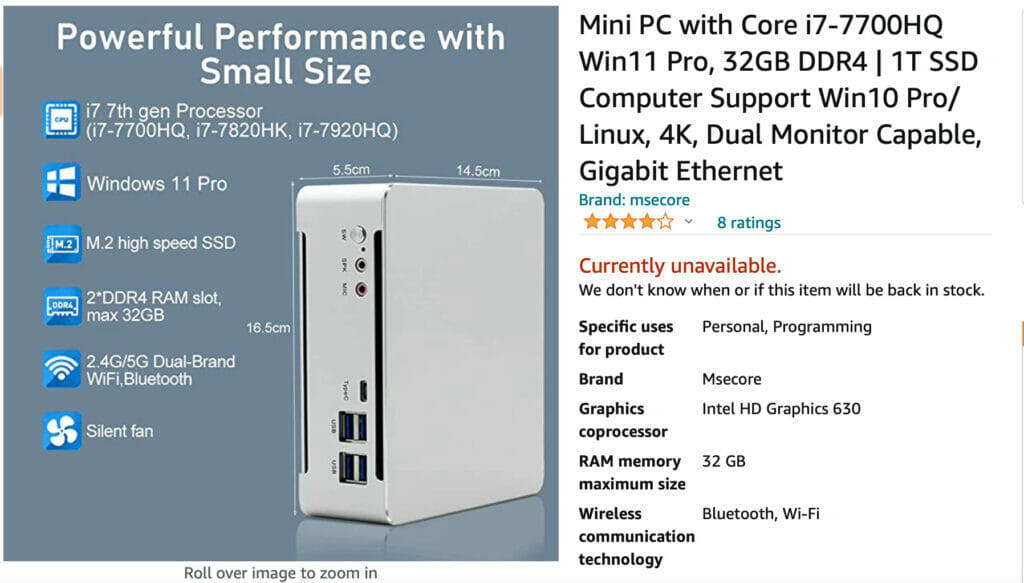
A neat little computer- the Msecore machines have a good reputation as a ‘no-name’ brand. But there was definitely some strangeness in setting it up, which ultimately I blame on Windows 11 and its ‘secure BIOS’ technologies.
Getting ready…
My first step was making ‘backups’ of some key files from Irene’s old computer. I plan on eventually pulling the hard drive out of the old computer and putting it in an external dock so Irene can ‘recover’ any missing files at her leisure. However, as the external enclosure is not here yet, I decided to copy files to a USB stick and then load them on the new machine.
Getting all the files copied took hours. It is funny: I can install an 80 GB game on my Xbox over the internet in a less than half of the time it took to copy 30 GB to a USB stick. This is using a high-performance USB 3 memory stick- it is just that slow.
Anyway, after all this I fired up the new machine and got… a weird staticky “AMI mega trends” BIOS splash then a screen full of garbage. I hung my head in shame: I should have tested this first. Thus began a comedy of debugging oddities.
Possible failed NVMe?
I took the new little machine apart. I was pleased to find it was clean and simple inside. Everything is accessible- RAM, storage (NVMe), etc- and clearly visible with removal of four screws and the base plate. So I unseated/reseated the RAM and storage- still garbage.
So then I pulled the NVMe card. NVMe is the ‘latest’ in high performance SSD storage: it basically looks like a RAM stick, but it is in fact persistent storage. The computer started up without issue after removing the NVMe, launching into the BIOS setup, which makes sense because without the storage there was nothing to boot from.
This ‘success’ without the storage installed made me think there was something wrong with the NVMe. So I then went scrounging for another one. I only have one such stick: in my personal gaming machine. With some trepidation, I pulled that stick from my gaming computer and installed it in Irene’s and… it booted into Windows 10 from the storage without issue.
This made me more certain that the NVMe that shipped with the new computer was defective, but I wanted to double-check. I re-installed the original stick and… the computer booted, failing with a ‘Insert media with a valid OS’ message.
Possible failed OS install?
My next hypothesis (fancy word for ‘structured guess’) was that the NVMe was fine, but the OS install was either corrupt or incomplete. The computer I purchased said “Windows 11”, but the description was not clear in terms of whether the OS was actually ‘included’ or just ‘supported’. So maybe it wasn’t installed?
There was nothing in the box with the new computer like a license key or install media, so I decided to start from scratch. I downloaded the Windows 11 install media and created a bootable install USB using my Mac. This involved purchase of a piece of code that that could produce bootable USBs for Windows on a macOS machine (WonderISO). If everything worked during the install I would have to buy a Windows license, but that could all be accomplished ‘after’ getting things working.
I then successfully booted off of the Windows 11 bootable USB I’d created and started the Windows 11 install process. After the first step I received the dreaded “This PC can’t run Windows 11” message. I knew this was a possibility from previous light research into Windows 11: the new Windows requires a ‘secure’ BIOS configuration. But I thought this new machine was ‘good to go’ with Windows 11.
Possible BIOS configuration problem?
I briefly considered making a Windows 10 install USB stick and trying that. Instead I -thankfully, as it turned out- decided first that I wanted to understand whether or not the PC I’d bought for Irene was ‘crippled’ with respect to Windows 11. I read a number of articles, one of which I link to here. At its core, you need two things on your PC BIOS to be able to install Windows 11: Secure Boot and TPM (Trusted Plaftorm Model) 2.0.
I booted the new machine into its BIOS again and… it seemed to have both features. But it was configured to support both ‘Legacy’ and ‘Secure Boot’: I switched it to ‘Secure Boot’ only, rebooted, and… was back to the weird staticky “AMI mega trends” BIOS splash then a screen full of garbage situation I’d started with.
On a whim, I pressed and held the power button for greater than five seconds on the new computer which is supposed to do a ‘full’ reset. I then powered it on again and it booted directly into the pre-installed Windows 11 Pro OS from the manufacturer on the NVMe. So Windows 11 Pro was included and ready to go- and I was minutes away from over-writing it with Windows 10.
What just happened?
I am not a Secure Boot / TPM 2.0 expert. But I vaguely understand that it associates ‘keys’ or signatures between the installed OS and BIOS. My hypothesis is that the manufacturer installed Windows 11 on the NVMe, probably using a different computer. They then didn’t ‘synchronize’ the keys with the BIOS with the machine they shipped. When the machine tried to boot off the storage it ‘corrupted’ the boot process instead of failing cleanly and producing some kind of useful error message.

I have no idea why the BIOS failed the way it did with a screen full of garbage while trying to boot the installed Windows 11 image on the NVMe. I would expect it to say something like “this OS was not installed on this computer” or otherwise give me a clue that the secure BIOS was rejecting the OS. I’m also not sure why setting the BIOS to ‘Secure Boot Only’ and doing a full BIOS reset worked. I had previously tried the same full BIOS reset without any progress. However, I wasn’t performing those steps ‘intelligently’, it was just me poking at things to see what happened.
I suspect (another word for ‘guess’) that this is all symptomatic of Secure BIOS and TPM 2.0 and their relationship to Windows 11 all being ‘new’. I wouldn’t be surprised to find that installing an updated BIOS on the machine might have resulted in a more useful sequence of errors.
Conclusion (kind of)
The Msecore ‘mini’ computer is working now- it was running as of about 1:00 AM today. It is fast, as it should be with 32 GB of RAM and NVMe storage. It is running Windows 11 without any apparent issues.
I didn’t really ‘want’ Windows 11, but I wanted this machine to last for a while. I was aware that Microsoft was making a number of low-level OS changes with Windows 11 and didn’t want to build an ‘orphan’ that couldn’t be upgraded a year or two from now.
I seem to have accomplished my basic objectives. I was finally able to start on getting Irene’s ‘stuff’ onto the new machine: email, browser bookmarks, documents, etc. Email in particular started a whole new chain of problems that kept me up past 3:00 AM.
Email has been a problem for Irene for a while. I recently moved her off of (I kid you not) Microsoft Live Mail 2012 that had become quite broken after Telus moved all of their email services to Google Gmail.
I completed the upgrade to Outlook 365 on her old machine some time back, but Irene hadn’t managed to get her mail ‘archive’ folders organized. The old machine is nightmarishly slow, so I don’t really blame her. When I upgraded to the new machine, neither she nor I were really sure whether I had everything in Outlook working. I had to go back to her old machine to get her to confirm everything looked ‘the same’.
I’m almost at the point I want to be in terms of the basic upgrade. Next will be recovering Irene’s bookmarks and such. And the ‘final’ step will be getting that external dock/enclosure I mentioned in the first couple of paragraphs set up. That should arrive late this week.
I really shouldn’t have started working on this at 10:00 PM…
I am appending to this article because I want to make some observations about the impact Windows 11 may have on the personal computing market. (This append is not a comment on your excellent work investigating the installation problems encountered as an early adopter of Windows 11.)
It is January 2nd, 2026 and, by now, Windows 10 is out of support (if one does not pay for a one year extension). Many casual Windows-based computer users know that they have to upgrade to Windows 11. But doing so comes at a cost to them: they must buy a new machine to accommodate the TPM chip requirement. But many users don’t have the disposable income to buy a new machine, and some others do not want the new AI features packaged with Windows 11. Furthermore, I saw a YouTube video that observed that some business users who did upgrade to Windows 11 found that their staff lost so much productivity that they reverted back to Windows 10. This same video stated that other Windows 11 users (such as professional gamers and data analysis researchers) went to acquire Macs or Linux machines just to avoid the performance degradation observed in their Windows 11 machines.
If Microsoft is unable to improve the Windows 11 performance or to allow users to avoid the AI features or to allow users to create local user accounts, then many users will stay away from Windows 11. But this may not be the Linux adoption bonanza or a Mac resurgence that those proponents are hoping for.
Instead, I suspect that many Windows computer users are non-technical consumers who simply need a computer to interact with retail websites and government services. For these users, their phone can become a viable alternative to a personal computer. They don’t need Windows, Linux, or Mac. They can do almost everything with their phone.
There may be some tasks that are clumsy to perform with a phone. But, with enough customers complaining about such inadequate support to perform those tasks on their phone. someone will take the opportunity to make an app to make it easier for those users. Eventually, casual users will be able to do everything with their phone. And the age of the casual personal computer will slowly come to an end.
I believe the PC will continue to be a valued tool for professional gamers, software developers and other technical professionals that need a high-powered computing machine for themselves. And these users will choose Linux and Mac for as an alternative to Windows. But this group of users will be a very small market relative to the casual consumer market and those users are likely, by now, used to doing everyday tasks using their phone. These users will see no need to upgrade to Windows 11, thus drawing a close to Microsoft’s O/S dominance in the PC market.