
My blog went down overnight without any planning on my part. When I checked it this morning, all three of my sites were showing an error that looked like this:

Not exactly a good thing for me to wake up to, but I was eventually able to debug the issue with help from Google / Google AI and get things back up and running again.
Misdirection and dead ends
One of the things that I often find frustrating with WordPress and its supporting software PHP and MySQL/MariaDB is the fact that logs don’t seem to be generated very consistently. There was effectively nothing for me to go on regarding the initial errors in the expected directories i.e.:
- /var/log/php-fpm
- /var/log/httpd
- /var/log/mariadb
I *did* see some entries in the HTTP logs that made me briefly think someone had hacked or was hacking into my site. But to be honest there are always lines like that in the logs: hack attempts are as plentiful and continuous as snowflakes in a prairie snowstorm. But I eventually set concerns about hacking aside and started digging back into a more mechanical cause.
The next step was to turn on WordPress debugging. This is done via the wp-config.php file and adding a couple of lines there:
// KGA enable debug
define('WP_DEBUG', true);
// Write errors to the /wp-content/debug.log file
define( 'WP_DEBUG_LOG', true);

/* That's all, stop editing! Happy blogging. */
You can also add more directives to prevent any debugging information from going to the user, but I didn’t bother with that. With debugging on I started to see a few more errors, and the failures were clearly something to do with connectivity to the database. I also noticed that my server had performed some OS upgrades overnight, but couldn’t see any obvious failure messages from that either.
I spent time spinning in circles with various database connectivity possibilities. I periodically was able to render pages from my blog, something which still confuses me but was probably related to my Cloudflare caching configuration. I tried numerous approaches including several changes to the wp-config.php file such as replacing ‘localhost’ with ‘127.0.0.1’ as the database connection host. Nothing seemed to work, and I began to be pretty frustrated.
I finally zoomed in on one page that I could reliably see fail: the search page. With debugging on I could see a specific line in the code that was failing, and it was a simple database connection. I tried something similar using the mysql command at the command line on my server and it also failed. Then I tried signing on to the database as the root user, and that also failed with a connection error. Finally I thought to check the status of the MariaDB (MySQL) service:
systemctl status mariadbThis presented output that clearly showed MariaDB wasn’t running at all: it had failed during startup. The fact that my site seemed to be occasionally rendering pages was a complete misdirection. Probably something related to the Fedora update was preventing MariaDB from starting up correctly.
The solution
The question now: what was causing MariaDB to fail during startup? I used my friendly Google search with this prompt:
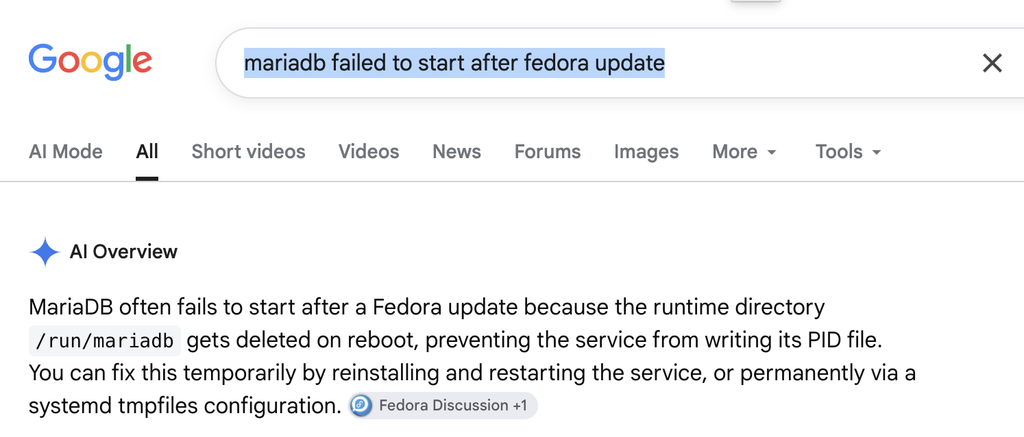
I checked, and sure enough the /run/mariadb directory was missing. I didn’t feel comfortable running a re-install of Maria DB, so I prompted Google again:
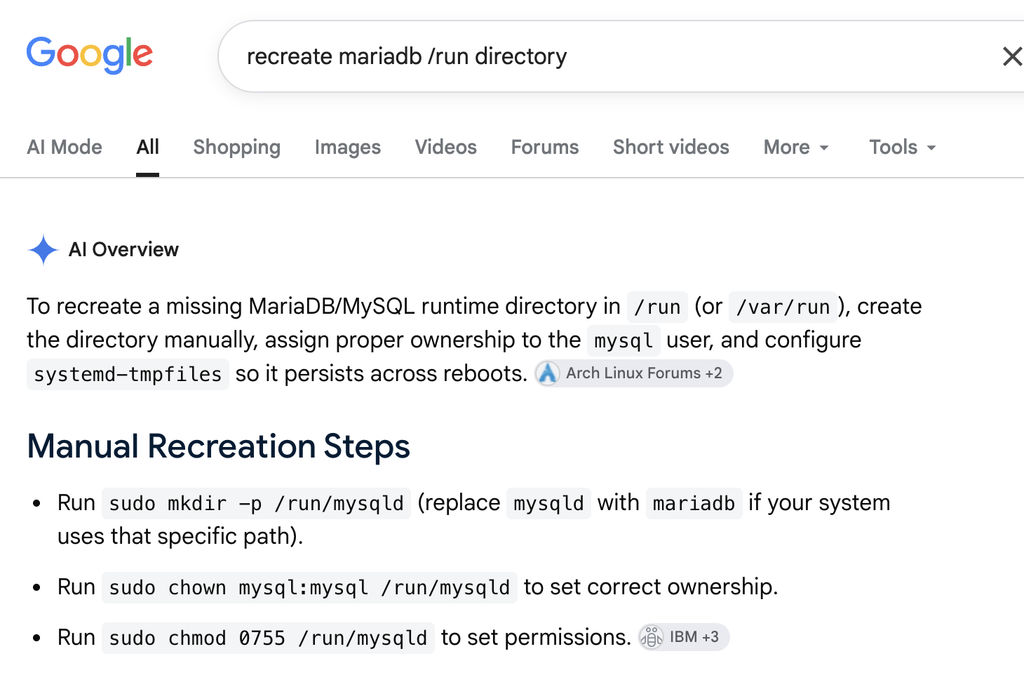
After completing the noted directory re-creation steps, including setting ownership and permissions, I was able to start MariaDB up without error:
[root@kgadams run]# systemctl status mariadb
? mariadb.service - MariaDB 10.11 database server
     Loaded: loaded (/usr/lib/systemd/system/mariadb.service; enabled; preset: disabled)
    Drop-In: /usr/lib/systemd/system/service.d
             ??10-timeout-abort.conf
<<SNIP>>
    Process: 4471 ExecStartPost=/usr/libexec/mariadb-check-upgrade (code=exited, status=0/SUCCESS)
    Process: 4516 ExecStartPost=/bin/rm -f /run/mariadb/wsrep-start-position (code=exited, status=0/SUCCESS)
   Main PID: 4456 (mariadbd)
     Status: "Taking your SQL requests now..."
      Tasks: 31 (limit: 76937)
     Memory: 1G (peak: 1G)
        CPU: 3.650s
     CGroup: /system.slice/mariadb.service
             ??4456 /usr/libexec/mariadbd --basedir=/usr
<<SNIP>>
Future occurrences
As it stands right now, the /run/mariadb directory disappears after every server restart and it will cause MariaDB to fail until it is manually re-created. This is obviously sub-optimal.
The guidance Google gave to “permanently” fix the problem by revising the /usr/lib/tmpfiles.d/mariadb.conf file appears to have already been done. So for now at least I don’t have a guaranteed way to prevent this from happening again: if a Fedora restart deletes the /run/mariadb directory then MariaDB will fail to start up and I’ll have to manually re-create the missing /run/mariadb folder.
However, MariaDB is widely used and this problem is pretty egregious: I can’t imagine that it will stay “unfixed” in Fedora core for very long. Hopefully I won’t experience another incident with this specific problem again.
Pingback: Resolving the MariaDB and Fedora problem – Ubergeek Kelly's World- Life, technology, science, rants