This blog runs on a small box (an Intel NUC) sitting in my basement using Fedora Core Linux. I have regularly forgotten this box in terms of maintenance for as much as a year or two. The good news is that the little machine keeps on working without a complaint.
The bad news is that a computer that is not updated is a machine ripe for invasion by miscreants. I have a pretty secure environment as the computer sits behind a fairly decent (pfsense) firewall, but it all really should be maintained more frequently. I resorted to the lazy man’s way: automation.
Making it automatic
Windows and MacOS have had automatic updates, where individual OS components are made current, and upgrades, where the core OS (kernel) is updated, for many years. Linux… not so much.
Each Linux distribution is likely to have a different package manager for the OS. With Fedora, that tooling is known as DNF (Dandified YUM), and it works well enough for updates. DNF has become increasingly capable of automation since about FC release 39 or thereabouts, but support for kernel upgrades has been lacking.
With Fedora Core (FC) 42/43 and DNF5, the automation support is basically complete. Now DNF can perform full kernel upgrades and related clean up. Or it could if everything worked the way it is supposed to. Spoiler alert: it doesn’t work the way it is supposed to.
Upgrades break new features
Every upgrade breaks features in previous versions of Fedora: that just seems to be the way things work with Linux. So if you were building a brand new machine with FC 43 automatic upgrading would probably work perfectly. But if you have upgraded from, say, FC 41 to 43 and have been running Fedora since sometime in the previous decade, chances are good that something will not work as planned.
Some of the problems are small, easy to detect, but hard to fix. For example, in my case the /boot partition is too small to support more than one FC upgrade package reliably. This is likely because /boot was created back when the kernel files were much smaller than they are now, and a 500 MB /boot was adequate. But this small size caused all the automated upgrades to fail, so I had to do some filesystem level massaging to get more space on /boot.
Some of the problems are less obvious. The failed upgrades resulted in the boot system (GRUB) not having the correct (latest) core selected, so boot failed. Debugging this required me to put a display and keyboard on my ‘headless’ NUC, which was a pain.
Weird problems
Then there are the weird problems that are likely entirely my own darn fault. dnf-automatic has a corresponding configuration file: /etc/dnf/automatic.conf. I set up emitters using the configuration file to send an email to my mail inbox upon completion of upgrades.
As I don’t have a commercial message transfer service to use I was obligated to come up with a workaround- I used msmtp so my server could send emails via a simple email account. This works great for general use, but I couldn’t get the dnf-automatic settings to work with it correctly despite finding several references. My solution for that problem: turn msmtp into a faux sendmail by making some changes at the command line:
# symbolic link to sendmail
sudo ln -s /usr/bin/msmtp /usr/sbin/sendmail

# set msmtp as alternative to sendmail for message transfer
sudo alternatives --install /usr/sbin/sendmail mta /usr/bin/msmtp 50?
sudo alternatives --set mta /usr/bin/msmtp
After doing the above I could just use the OS default ‘mail’ and that worked without issue with dnf-automatic using the following settings in /etc/dnf/automatic.conf.
[emitters]
...

# How to send messages.  Valid options are stdio, email and motd.  If
...
emit_via = command_email
...

[command_email]
...
command_format = "mail -Ssendwait -s {subject} -r {email_from} {email_to}"

# KGA attempted to use msmtp directly without success
# - ended up mappimg it to replace sendmail and using 'mail' instead
#command_format = "/usr/bin/msmtp --from {email_from} {email_to}"
#command_format = "/usr/bin/msmtp -t"

# The contents of stdin to pass to the command. It is a format string with the
# same arguments as `command_format`.
stdin_format = "{body}"

# KGA attempted to use msmtp directly without success
#stdin_format = "From: {email_from}\nTo: {email_to}\nSubject: {subject}\n\n{body}"
Note that I left a few of my failed configuration attempts using msmtp commented out to illustrate that those attempts didn’t work. I am pretty sure the problem is something wrong with the behaviour of ‘stdin_format' and that directive not recognizing any keywords other than {body}.
Headless problems
I mentioned in the Upgrades break new features section above, sometimes a problem occurs that can’t be fixed with a terminal session. Notably, any problem that interrupts the boot process before the OS actually boots such as a problem with the GRUB boot loader will require a display and keyboard attached to the host computer to fix.
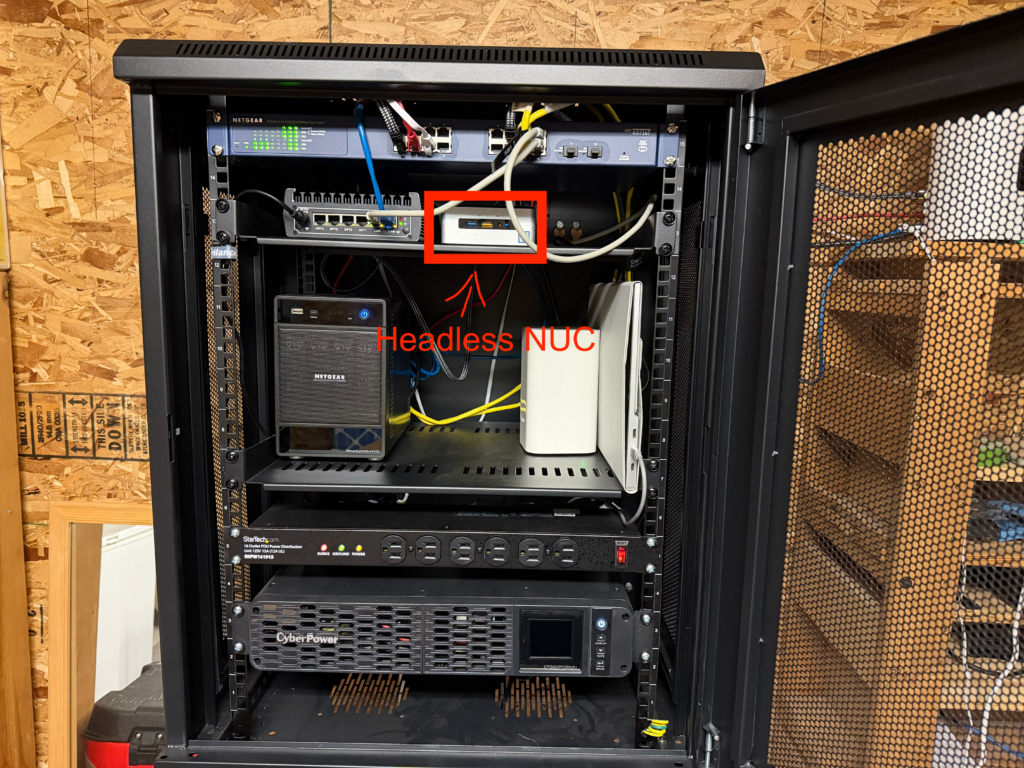
I normally leave my NUC ‘headless’, with no display, keyboard, or mouse. This works great most of the time: I have a small rack for my server and network gear, and adding a display to it would be expensive. I’ve been tempted several times, though: a KVM tray with a 15″ display is awfully tempting even if it does cost nearly a grand.
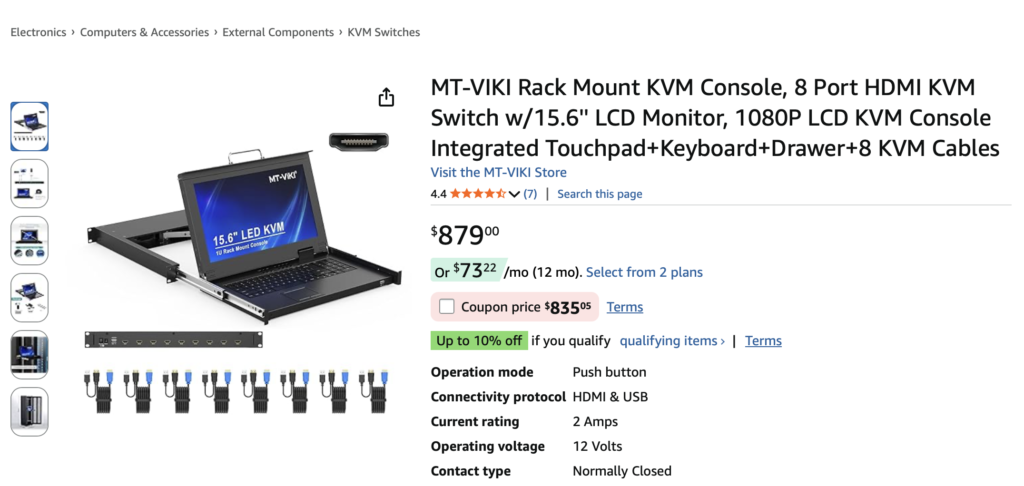
But dragging a monitor and keyboard to the rack is generally a big pain. Inevitably these problems happen in the wee hours, and schlepping a keyboard and display late at night isn’t ideal. So I’ve decided to cobble something together from some of my leftover gear.
My ‘make do’ approach is to re-use some old equipment and some comparatively cheap non-specialized new hardware. A portable display I bought back when I was still working at IBM will slip flat into the rack, and a small keyboard with trackpad from Amazon will likewise sneak somewhere adjacent to the display. There they will wait to be inelegantly pulled out on and balanced on available surfaces on those rare occasions I need them. Hopefully I won’t require them again for a while.
Success
The first truly automatic update ran last night, completed four (4) updates and sent the email below to me.
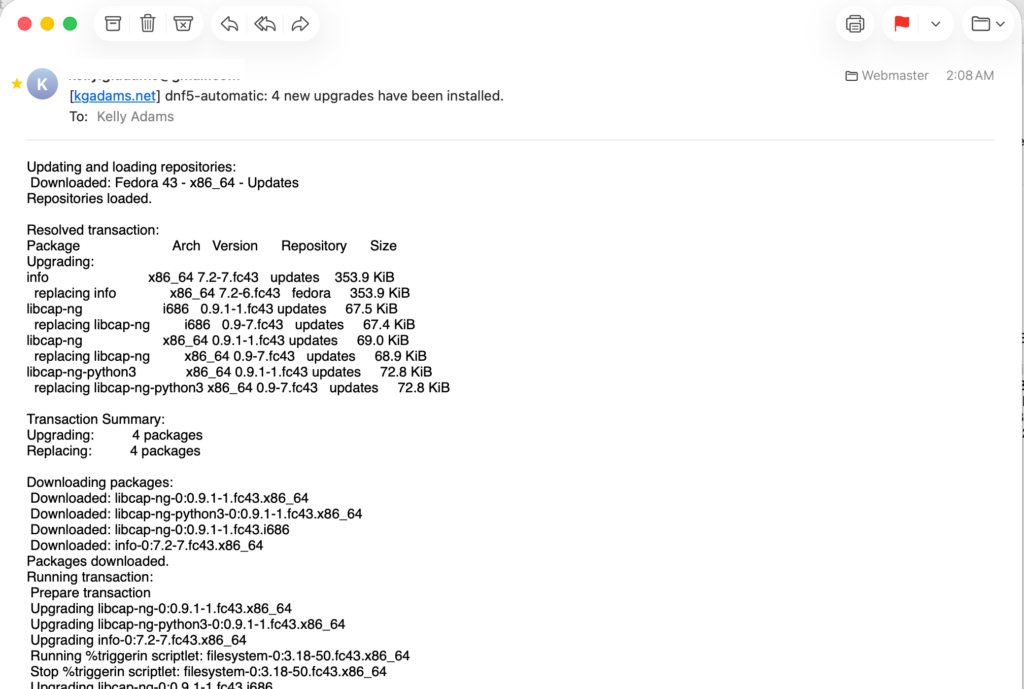
I still need to see a full kernel upgrade with reboot complete successfully before I will know that my changes were truly successful. But that kind of upgrade is a bit less frequent- perhaps once or twice a month I believe- so it may be a while. Still, I consider an update with a readable email notifying me of it to be good progress towards automation.