
I spent a bit of time on Monday adding a PHP code snippet to my WordPress site that outputs a total monthly word count and average word count per post to the archives page. This is far from a complex bit of code, and I used AI to get the basics, but here it is.
PHP snippet to add word counts
A few notes:
- This code only works on WordPress
- it is best used with a plugin like WPCode or Code Snippets to allow such small blocks of code to be added without interfering with WordPress’ built in code functionality or requiring editing of any core theme files
- A transient cache is in place for the two database results used to improve performance and reduce database impact; adjust the set_transient timeout values to suit your needs (currently set to 12 hours)
- the average is generated inefficiently: the monthly post count is already generated as part of the page logic. But I’m not sure where that value is or how to access it, so I re-generated it with another SQL query
- there is a potential logic flaw in the way the ‘word_count’ and ‘count’ values are retrieved. They can be updated separately, potentially having an out of date post count when the word_count changes. I will likely look at forcing them both to be updated if either of them changes in a future code update
<?php
add_filter('get_archives_link', 'wp_add_word_count_to_monthly_archives', 10, 6);

/**
 * Appends total word count to monthly archive links.
 *
 * @param string $link_html The archive HTML link content.
 * @param string $url       URL to archive.
 * @param string $text      Archive text description (e.g., "August 2026").
 * @param string $format    Link format ('html', 'option', etc.).
 * @param string $before    Content to prepend.
 * @param string $after     Content to append.
 * @return string Modified HTML link content.
 */
function wp_add_word_count_to_monthly_archives($link_html, $url, $text, $format, $before, $after) {
    // Only apply this to HTML formatted links (like <li>) to prevent breaking dropdown options
    if ('html' !== $format) {
        return $link_html;
    }

    // Attempt to parse the month and year from the archive text link
    $timestamp = strtotime($text);
    if (!$timestamp) {
        return $link_html;
    }

    $year  = date('Y', $timestamp);
    $month = date('m', $timestamp);

    // Use a transient cache to prevent heavy database queries on every page load
    $transient_key = 'wp_archive_word_count_' . $year . '_' . $month;
    $transient_key_count = 'wp_archive_count_'  . $year . '_' . $month;
    $word_count    = get_transient($transient_key);
    $count = get_transient($transient_key_count);

    if (false === $word_count) {
        global $wpdb;

        // SQL query to calculate approximate word count by counting spaces in post_content
        $word_count = $wpdb->get_var($wpdb->prepare(
            "SELECT SUM(
                LENGTH(post_content) - LENGTH(REPLACE(post_content, ' ', '')) + 1
            )
            FROM $wpdb->posts
            WHERE post_status = 'publish'
              AND post_type = 'post'
              AND YEAR(post_date) = %d
              AND MONTH(post_date) = %d",
            $year,
            $month
        ));

        // Default to 0 if no words found
        $word_count = $word_count ? (int) $word_count : 0;

        // Cache the result for 12 hours
        set_transient($transient_key, $word_count, 12 * HOUR_IN_SECONDS);
    }

    if (false === $count) {
        global $wpdb;

	// get the count of posts for the month
        $count = $wpdb->get_var($wpdb->prepare(
            "SELECT COUNT(*)
            FROM $wpdb->posts
            WHERE post_status = 'publish'
              AND post_type = 'post'
              AND YEAR(post_date) = %d
              AND MONTH(post_date) = %d",
            $year,
            $month
        ));

        // Default to 0 if no posts found
        $count = $count ? (int) $count : 0;

        // Cache the result for 12 hours
        set_transient($transient_key_count, $count, 12 * HOUR_IN_SECONDS);
    }

    // Format the number for cleaner display (e.g., 12,500 words)
    $formatted_word_count = number_format($word_count);
	if ($count > 0) {
	    $formatted_average = number_format($word_count / $count);
	} else {
		$formatted_average = 0;
	}

    // Append the word count right before the closing </a> tag
    $link_html = str_replace('</a>', "</a> ($formatted_word_count words; $formatted_average avg. words per post)", $link_html);

    return $link_html;
}
The output on an archive page after adding this snippet to WordPress looks like this:
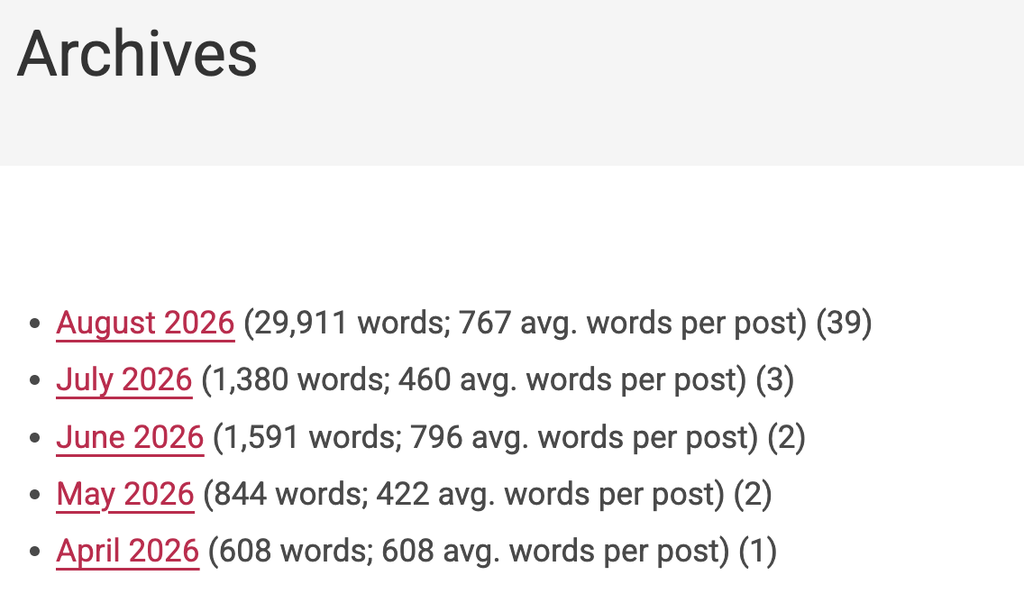
The good news is that I can see my average post length now is under 1,000 words. The bad news is that I can see my average post length sometimes dips down below 500 words per post, which is a bit sparse. Regardless, it makes me happy to have this information, and now you have it too!
AI was used to generate the header image (ChatGPT) and most of the code (Google search AI)