

I mentioned previously that I had installed Ultimate Tag Warrior on my site. In that posting, I implied that I had Ecto for Windows working with UTW. The truth is, it only seemed to be working- in reality, Ecto was creating tags that UTW could work with, but it wasn’t able to read them back in for editing purposes.
It’s been a bit of a struggle getting it to work…
I had started with a hack from Robin Lu purportedly for exactly my purpose: getting Ecto and UTW to talk nicely together. In essence, his solution was to use Ecto’s ability to store/retrieve keywords within the XML “mt_keywords” tag used with the MovableType API. A small change was made to WordPress’ xmlrpc.php file, and everything should have worked. Unfortunately, not quite. Either Robin’s hack never actually worked,
or it only worked with the Mac version of Ecto, or Ecto has changed. In the Windows version of Ecto, the values passed and read via the mt_keywords field must be surrounded by some sort of stop and start string (normally an HTML comment). Further, in my testing each keyword also has to be surrounded by an HTML link tag (E.G.: <a href=>tag</a>) or else Ecto for Windows will fail with an error when reading the tags for the post.
Netting it all out, the basic steps to getting Ecto for Windows Version 2 to work with WordPress 2.0.1 and Ultimate Tag Warrior are:
- << before completing these steps, WordPress and UTW are presumed to be configured and working on your blog server >>
- in your WordPress installation directory, edit /update xmlrpc.php (first preserve/back up a copy of the original)
- there are a few changes- I’ve captured the output of a diff between the edited xmlrpc and the original, as well as a copy of the edited xmlrpc
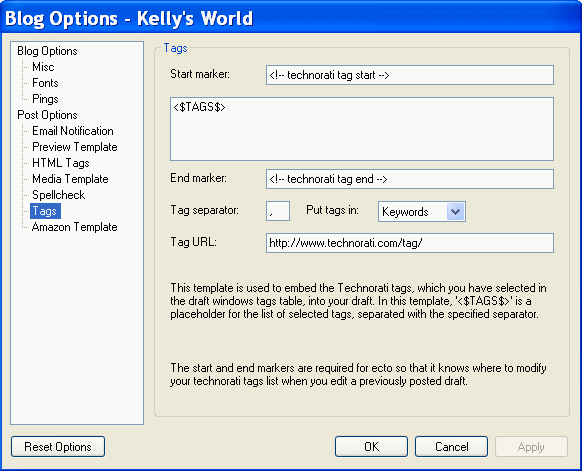
If all goes well, you should now be able to post blog entries with tags that get inserted/managed via UTW, and Ecto should allow you to view/edit the tags associated with a particular post.
This was a big help. I appreciate the info.